
Fire & Rescue Agency Contribution Instructions
Here you will learn about the steps and actions you can take in ORBIT for your personnel who are members Firefighters' and Rescue Squad Workers' Pension Fund.
Visit ORBIT and select the link under the EMPLOYER & FRSW Admin header. In some cases, this may fall to the next row depending on your screen.
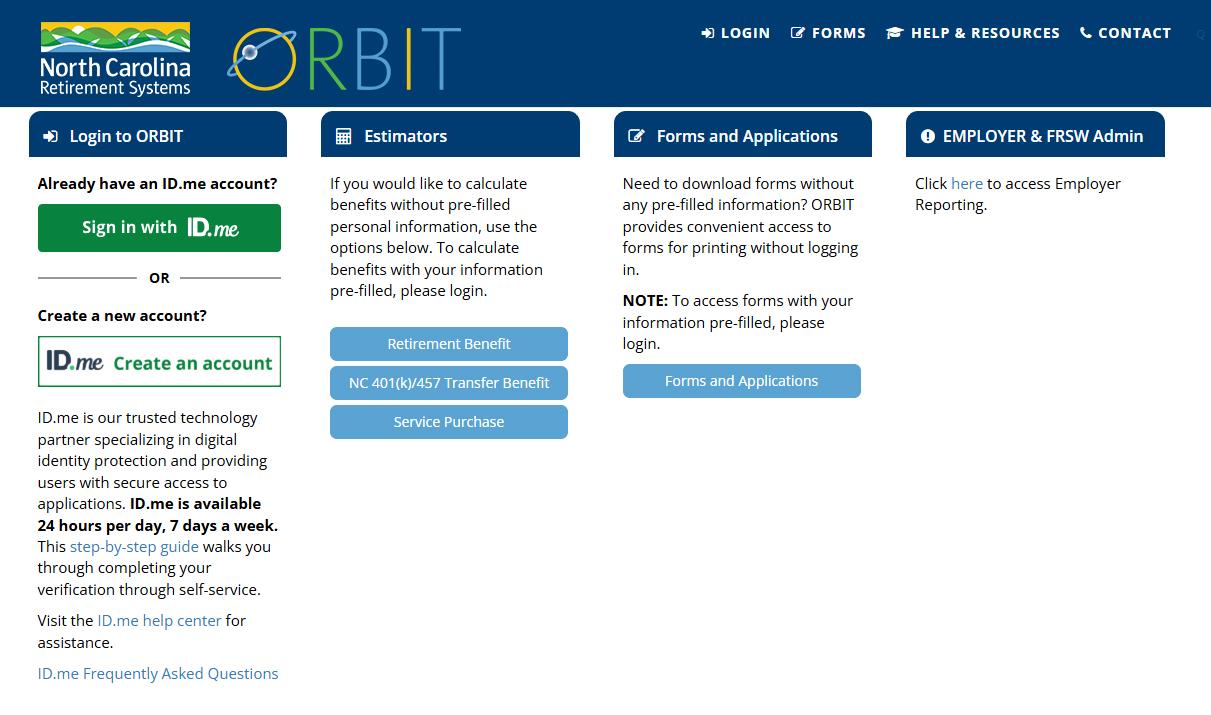
Step-by-Step Guide
Once you have clicked the link on the ORBIT landing page, a new window will take you to the ORBIT Employers login. Each agency is assigned a unique user ID and password for an Agency Admin point of contact.
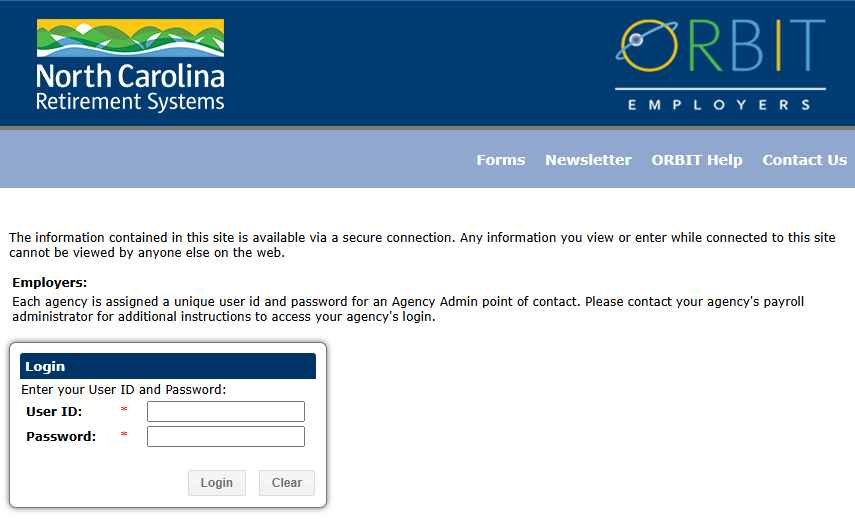
Begin Reporting Here will unfold a menu: Fire & Rescue > Agency Contribution or Remove Member.
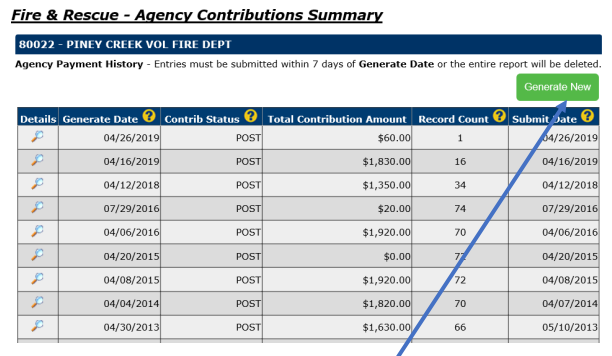
Select Agency Contribution. You will land on a summary page of your contribution history.
To add a new agency contribution, click the green Generate New.
You now have the option to update the contribution(s) for one or all members on your roster.
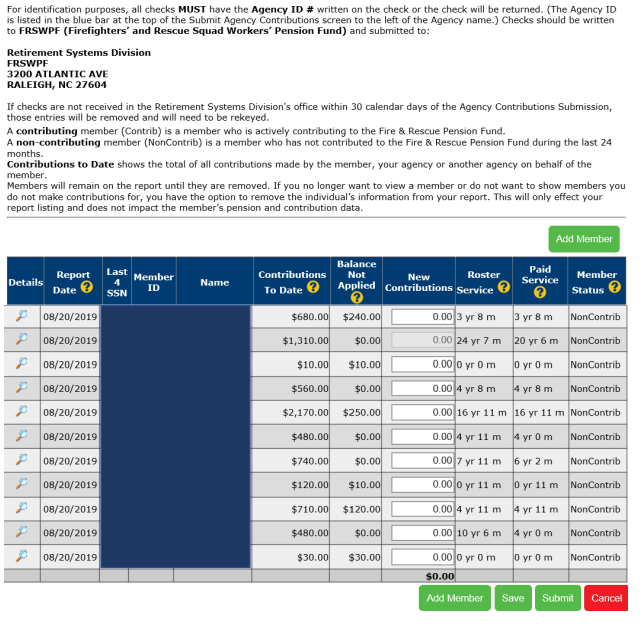
If you must leave the website before submitting your report, please save the report to ensure the contributions that you have entered are viewable upon your return. If you return within 7 days, the report you saved will be reflected with the date the report was created and a status of “Create”. When you click on the magnifying glass next to the report in the “Create” status, the contributions you added previously will be viewable and you may continue to add or remove members, add contributions and then submit the report.
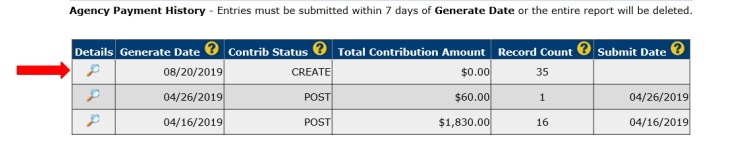
If you leave this page without submitting the report, the information you entered will be saved for 7 days. After 7 days, if the report is not submitted, the information on the report will be deleted.
To add a new member, click the green Add Member button at the bottom of the screen.
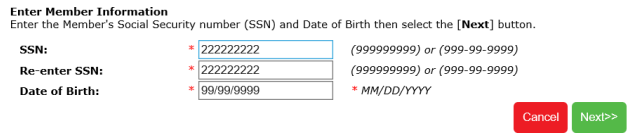
Enter the member's Social Security Number (SSN) and date of birth. The SSN can be entered with or without dashes. The date of birth should be entered in the following format mm/dd/yyyy (04/24/2000).
You will be required to enter the SSN two times for verification purposes.
Enter the new member’s information, Name, address, gender and the date the member joined the Agency. The Chief will also need to certify information entered by checking the box as shown below.
Note – when submitting your check, please provide federal/military ID and documentation for proof of birth, such as a birth certificate, for any new members added.
Once all information is entered for the new member, click Save. The member ID will be assigned once the contributions are posted to the account.
To remove a member from your roster, click Remove Member in the navigation under Begin Reporting Here.
On the list of members, click the box to the left of the member(s) you wish to remove. If a contribution is pending for a member, the member can’t be removed.
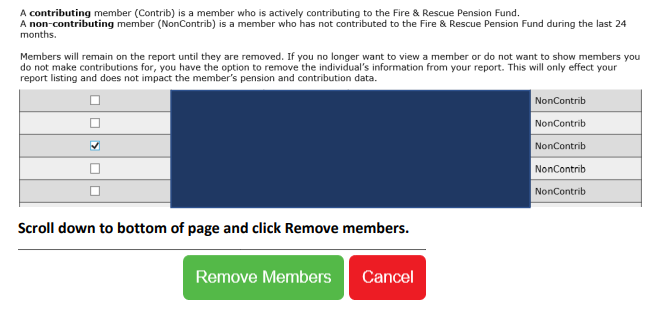
Scroll and select Remove Members. You will receive a confirmation message that the members were removed.
When the report is completed with all your contributions and additions, click “Save”. The total of the contributions will now appear at the bottom of the screen. Click “Submit” when ready to submit the report. Once the report has been submitted, no changes will be allowed, and you will need to wait one calendar day before generating a new report.
Once submitted, you will be taken to the report summary page. Notice the contribution status is now Submit. Note – You cannot remove members while the report is in Submit status.

The contribution check can be sent without a printed report. If you do send the contribution check without the printed report, please make sure to write your agency ID number on the check.
“Turn Around Documents” have been renamed “Agency Contributions” to more accurately reflect the new process Fire & Rescue Departments will be using. The terms below are associated with that new process in ORBIT Employer Reporting.
Generate date (Agency Contributions Summary screen): The date that you first access the Agency Contributions Summary screen.
Contrib Status: Status of the report (status will be one of the following):
- Create – Agency Contributions report has been created
- Submit – Agency Contributions report has been submitted
- Balance – Agency Contributions have been received and are currently being processed by a Retirement Systems Division analyst
- Post – Agency Contributions have been processed and credited to the members' accounts
Record Count: The total number of members that you entered contributions for on the report
Submit Date: The date you submit the report
Report Date (on individual records): The date that you created the Agency Contributions report
Contributions to Date: Total regular contributions submitted to date (does not include contributions from service purchases--see Paid Service definition)
Balance Not Applied: Remaining contributions not associated with service. These contributions will be applied to the current year or later once accompanied by roster service—see Roster Service
Roster Service: The total number of years since enrolling in the Pension Fund for which the member was reported on rosters from the NCSFA and/or NCAREMS as having obtained at least 36 hours of training per calendar year (includes prior service purchased)
Paid Service: The total number of years of service credited from contributions for each member (includes purchased service)
Member Status: Will be one of the following:
- Contributing (Contrib) is a member who is actively contributing to the Firefighters' and Rescue Squad Workers' Pension Fund.
- Non-contributing (NonContrib) is a member who has not contributed to the Firefighters' and Rescue Squad Workers' Pension Fund during the last 24 months. Note – paid-in-full member status changes to non-contributing after 24 months
Date Member Joined Agency: The date the member joined this department/agency
Enrollment Date: The date the member enrolled in the Firefighters' and Rescue Squad Workers' Pension Fund (date Retirement Systems Division received information to enroll member in Pension Fund)
This page was last modified on 05/07/2026